
KEYWISE · FUNCTION KEYS
Fn, Globe and Fn Lock: change what your function keys do
Changing Fn behavior usually swaps the top row between media controls and F1–F12. It does not universally disable the Fn key. Fn itself may be handled before the browser receives any event.
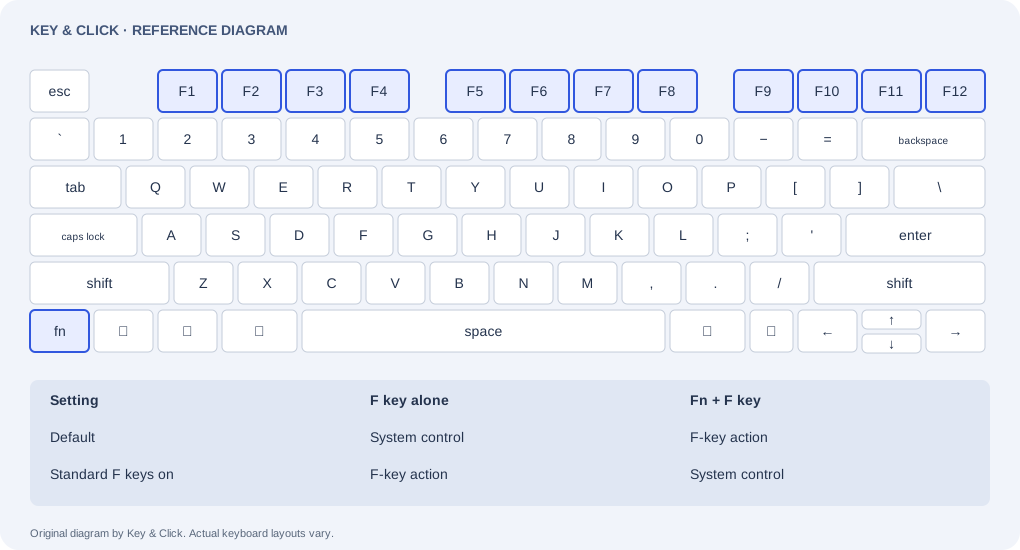
On a Mac: choose the default top-row behavior
- For macOS Ventura or later, open System Settings → Keyboard → Keyboard Shortcuts → Function Keys. On older versions, look in System Preferences → Keyboard.
- Enable the option labelled “Use F1, F2, etc. keys as standard function keys” to prefer F-key actions. Turn it off to prefer the top-row system controls. Fn/Globe accesses the alternative behavior.
- Check the separate system shortcut if an F key still opens a system feature. External keyboards may need their manufacturer’s utility rather than this Apple setting.
On a PC: Fn Lock depends on the keyboard
Fn + Esc toggles Fn Lock on some supported Dell and Lenovo models. It is not a Windows or Linux rule, and other keyboards use different combinations, utilities or firmware settings. Find your exact model in its manufacturer’s manual before changing anything.
Look for an Fn Lock symbol or indicator, then compare one key before and after the documented change. Record the original setting so you can restore it. Do not assume that a missing indicator means the keyboard has no Fn layer.
Why Fn can work without lighting up
The W3C key-value reference notes that Fn is typically handled in hardware without a key event. Key & Click lights it only when reported and leaves it out of the coverage denominator. Test the resulting action too: a brightness change or an F-key action can show that the combination did something, without proving what the browser received.
Settings and behavior vary by OS release, browser and device. This is a troubleshooting guide, not hardware certification.
Suggest a correction →